StepFunctions
Documentation for StepFunctions. StepFunctions.jl provides a simple implementation of right-continuous piecewise constant functions and basic operations on them.
Basic Usage
A step function is represented by breakpoints xs, an initial value y0 (for t < xs[1]), and a value vector ys (values on the half-open intervals [xs[i], xs[i+1]) and [xs[end], ∞)).
using StepFunctions

# there are two ways to generate step functions
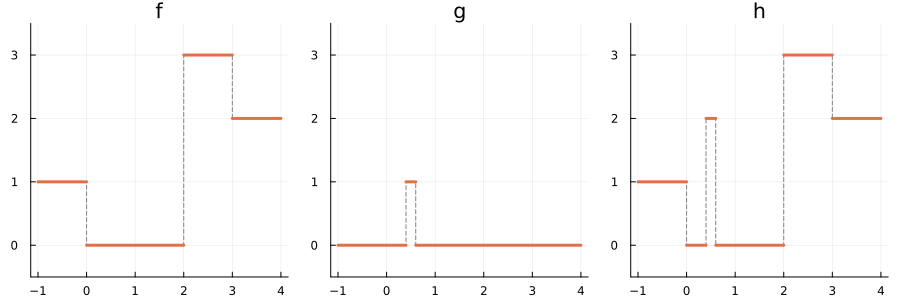
f = StepFunction([0, 2, 3], 1, [0, 3, 2])

# alternative construtor, the initial y-value is the first value
g = StepFunction([0.4, 0.6], [0, 1, 0])

# basic arithmetic
h = f + 2 * g

# Evaluation
f(2.5) # 3
Plotting
The package provides extensions for Plots and Makie. We can plot f, g, and has follows.
using Plots

ylims = (-0.5, 3.5)

p1 = plot(f, -1, 4, linewidth=1, color=:gray, linestyle=:dash, connect_vertical=true, legend=false, title="f", ylims=ylims)
plot!(p1, f, -1, 4, linewidth=3, legend=false, ylims=ylims)

p2 = plot(g, -1, 4, linewidth=1, color=:gray, linestyle=:dash, connect_vertical=true, legend=false, title="g", ylims=ylims)
plot!(p2, g, -1, 4, linewidth=3, legend=false, ylims=ylims)

p3 = plot(h, -1, 4, linewidth=1, color=:gray, linestyle=:dash, connect_vertical=true, legend=false, title="h", ylims=ylims)
plot!(p3, h, -1, 4, linewidth=3, legend=false, ylims=ylims)

plot(p1, p2, p3, layout=(1,3), size=(900,300))